The Mac app for custody call evidence

Your calls tell
the whole story.

Exhibit A reads the call history and iMessages already on your Mac and turns them into court-ready PDF exhibits — color-coded calendars a judge understands in seconds. No data entry, no cloud, no account.

Download for Mac — Free

macOS 12+Free tier available · No account required

Exhibit A

Actual app running with sample data

Or view a sample exhibit PDF →

The Deliverable

This is what you hand the judge.

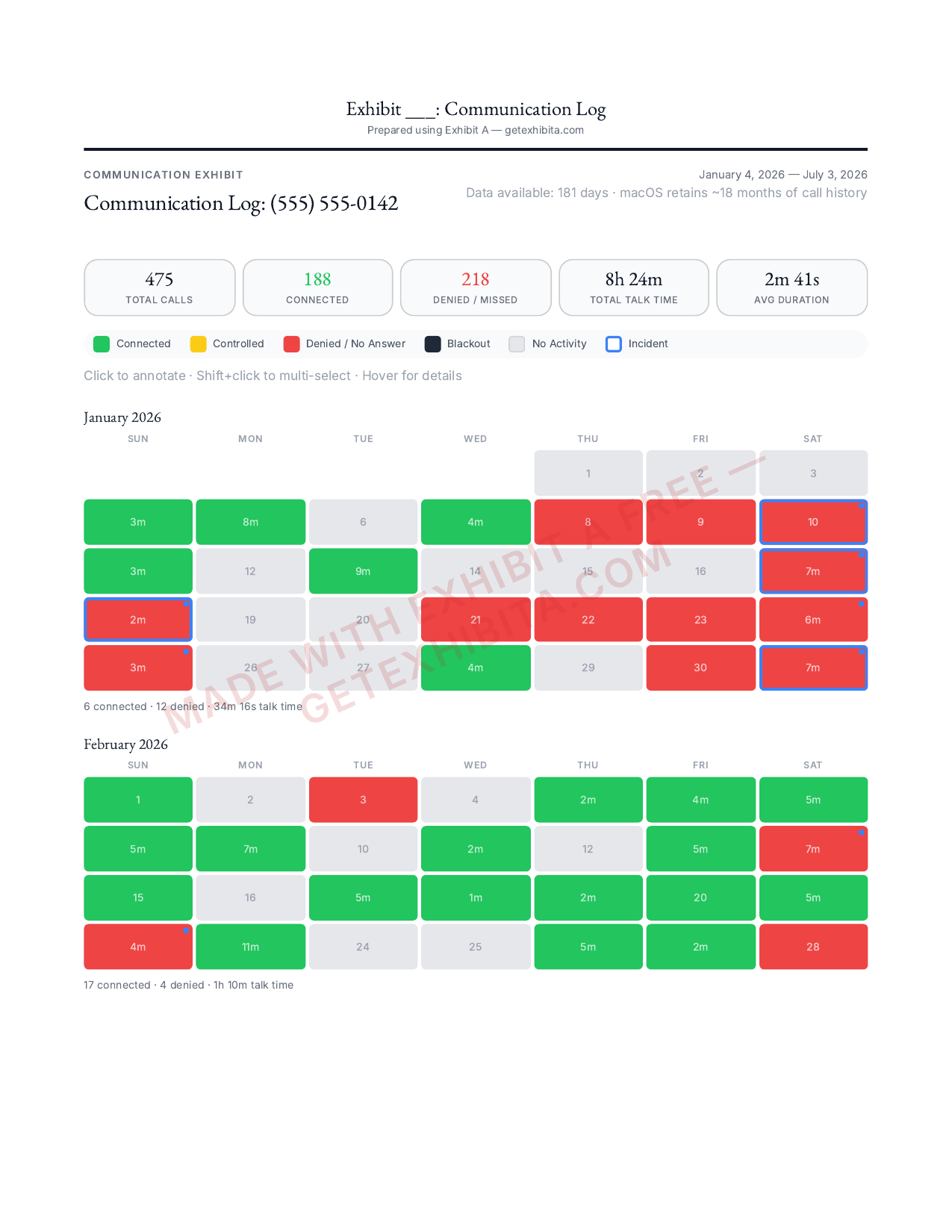
A clean, professional PDF: your call totals up front, then a color-coded calendar for every month — green for connected, red for denied, with your notes and incident markers attached to the exact days they happened. No spreadsheets, no screenshots, nothing to explain.

This sample was exported straight from the app using sample data. Yours will look exactly like this — with your real record.

View the full sample exhibit (PDF)
Download the app free →

Sample court exhibit PDF page: communication log with call statistics and a color-coded calendar

Why This Exists

Built during a real custody case.

When my children were taken to another state, I spent nights scrolling through months of call logs — counting denied FaceTime requests, documenting the calls that connected, and trying to show a judge that I was fighting to stay in their lives.

I was copying timestamps into spreadsheets. Highlighting rows by hand. Trying to make something a court would actually look at. My lawyer charged $350/hour for the same thing. There had to be a better way.

So I built one. Exhibit A reads the call history and iMessage database that already lives on your Mac and turns it into a color-coded calendar a judge can understand in seconds. Green for connected. Red for denied. Black for the days you weren't allowed to talk to your kids at all.

Every feature in this app exists because a real parent needed it during a real case. If you're going through this — you're not alone, and your evidence deserves to be seen.

Features

Everything you need to build your case.

Call History Calendar

Reads your Mac's call database automatically. Color-coded heatmap: green for connected, red for denied, yellow for controlled, black for blackout periods.

iMessage Cross-Reference

See texts and calls on the same day side by side. Cross-references your iMessage data with call logs for a complete communication picture.

Shift+Click

Multi-Select Batch Editing

Shift+click to select multiple days at once. Mark them all as denied, controlled, or blackout in a single action.

Coaching & Alienation Markers

Flag specific days when parental alienation or coaching incidents were observed. Add notes and build a pattern over time.

PDF

Court-Ready PDF Export

Export professional exhibits with print-optimized formatting, complete statistics, and a color-coded legend. Ready to file.

100% Local & Private

Your data never leaves your computer. No cloud uploads, no accounts, no tracking. Everything stays on your Mac.

“You didn't answer the phone on March 3rd, did you?”

Your answer — recorded, timed, ready to review

New in 1.2

Hearing Prep

Cross-examination is a skill — practice it before it counts. Drill question banks with a spoken mock-examiner, see the trap behind each question, record your answers with pace feedback, and rehearse prepared testimony on a teleprompter. Like everything in Exhibit A, it runs entirely on your Mac. A practice aid, not legal advice.

Included with every paid plan — from the $39 one-time Case Pass.

On the Roadmap

Financial AnalysisComing Soon

Upload bank PDFs, auto-categorize spending

Settlement AnalyzerComing Soon

AI-powered proposal analysis

Windows SupportComing Soon

Bring Exhibit A to PC

How It Works

Three steps. No data entry.

1

Download & Open

Download the signed DMG, drag to Applications, and launch. No account creation needed.

2

Grant Access

Approve one-time Full Disk Access so Exhibit A can read your call history. The app walks you through it.

3

See Your Exhibit

Select a contact and see your color-coded calendar exhibit instantly. Export to PDF when you're ready.

Pricing

Start free. Upgrade when you're ready.

See your call history calendar free, as long as you like. Pay only when you need the court-ready export.

See a sample of what you're buying

Family-law firm? See the Attorney tier

In the middle of a case right now?

The 90-day Case Passunlocks everything — court-ready exports, iMessage cross-reference, and the new Hearing Prep testimony practice — for one flat payment. No subscription to remember to cancel.

Free

$0

Forever free

  • 1 contact
  • Call history calendar
  • Basic color coding
  • 100% local & private
  • PDF export
  • iMessage cross-reference
  • Hearing Prep testimony practice
  • Coaching markers
  • Batch editing
Download Free

Pro

$14/month

or $79/year (save 53%)

  • Unlimited contacts
  • Full PDF export
  • iMessage cross-reference
  • Hearing Prep testimony practice — new
  • Coaching & alienation markers
  • Multi-select batch editing
  • All statistics & summaries
  • Priority support

30-day money-back guarantee

One case?

Launch Price — Limited Time

Lifetime

$149one-time

Pay once, own it forever. Launch price.

  • Everything in Pro
  • Lifetime updates included
  • No subscription ever
  • All future features
  • Founding member status

30-day money-back guarantee

Your data never leaves your computerNo account requiredNot legal adviceBuilt by a parent, for parents

Now on Windows & any browser

No install. It runs right in your browser.

Exhibit A now builds the same court-ready exhibits from your iPhone backup entirely inside your web browser — on Windows, a Chromebook, anywhere. Back up your iPhone with iTunes or the Apple Devices app, open the backup, and everything is read and rendered on your own machine. Nothing is ever uploaded.

Works in Chrome and Edge. Free to preview — pay only when you export.

FAQ

Common questions.

Will anyone know I'm using this?

No. Exhibit A runs entirely on your Mac and reads only data that's already there. It doesn't contact the other parent, your carrier, or anyone else — there are no notifications, no shared accounts, and nothing is uploaded.

Can I use these exhibits in court?

Exhibit A formats your own call and message records into clear, professional PDF exhibits — the same data your phone already keeps, presented so a judge can read it in seconds. Whether and how to submit them is a question for your attorney, since admissibility rules vary by jurisdiction.

What if it doesn't work for my case?

Every paid plan comes with a 30-day money-back guarantee, no questions asked. Email support@getexhibita.com and we'll refund you in full. You can also use the free tier as long as you like before upgrading.

What is the Case Pass?

The Case Pass is a one-time $39 purchase that unlocks everything in Pro for 90 days from activation — unlimited contacts, PDF export, iMessage cross-reference, and all statistics. There's no subscription and nothing to cancel; after 90 days the app simply returns to the free tier. It comes with the same 30-day money-back guarantee as every paid plan.

What data does it read?

Exhibit A reads your Mac's CallHistory.db and chat.db (iMessage). Note that macOS only retains a limited window of call history, so Exhibit A also lets you manually log and annotate calls. Your data never leaves your Mac — nothing is uploaded anywhere.

Do I need Full Disk Access?

Yes, to read your call history and iMessage databases. The app guides you through a one-time setup in System Settings — it takes about 30 seconds.

Is this legal advice?

No. Exhibit A helps you organize evidence into professional exhibits. Always consult a licensed attorney for legal guidance specific to your case.

Can my attorney use this?

Yes. Attorneys can review the PDF exhibits you export. There's also a dedicated Attorney tier with a separate workspace per client, court captions on exports, and iPhone-backup import — see getexhibita.com/attorneys.

What if my case is already over?

You can still use Exhibit A to organize historical call records for appeals, modifications, or enforcement actions. Note that macOS only retains a limited window of call history, but any calls you've already logged and annotated in the app are saved permanently.

Does it work on Windows?

Yes. Alongside the Mac app, Exhibit A runs entirely in your web browser on Windows (or any computer) — just open getexhibita.com/app in Chrome or Edge. Back up your iPhone to your PC with iTunes or the Apple Devices app, point the web app at the backup, and it reads and formats everything locally. Nothing is uploaded.

Your evidence deserves to be seen.

Download Exhibit A and turn your call history into court-ready exhibits in minutes. Free to start — no account required.

Download Exhibit A for Mac

macOS 12+Free tier available · Signed & notarized

or

Get notified about new features & Windows support

No spam. Unsubscribe anytime.